Local testing with Test Execution - Cloud
This document explains cloud executions run against applications that are not publicly accessible.
If your application under test (AUT) is hosted in a private network or behind a firewall, Test Execution - Cloud cannot reach it by default. Choose one of the following approaches depending on your environment:
| Option | When to use |
|---|---|
| IP Allowed List | AUT is behind a firewall but reachable from the internet. Whitelist Katalon's outgoing IP addresses in your firewall. |
| Katalon Tunnel | AUT is inside a fully private network with no public internet access. Install a tunnel client to create a secure connection. |
IP Allowed List
If your application is publicly accessible but protected by a firewall, allow Test Execution - Cloud to reach it by adding Katalon's NAT Gateway IP addresses to your firewall allowlist.
US region:
34.197.223.4354.82.166.18554.197.235.86
EU region:
3.74.38.2383.64.239.833.122.33.200
Once the IPs are allowlisted, enable the Private/Local Testing toggle in your test run's Advanced Settings to route traffic through those addresses.
Katalon Tunnel
If your application is inside a fully private network that has no public internet access, use Katalon Tunnel to establish a secure connection between Test Execution - Cloud and your private environment.
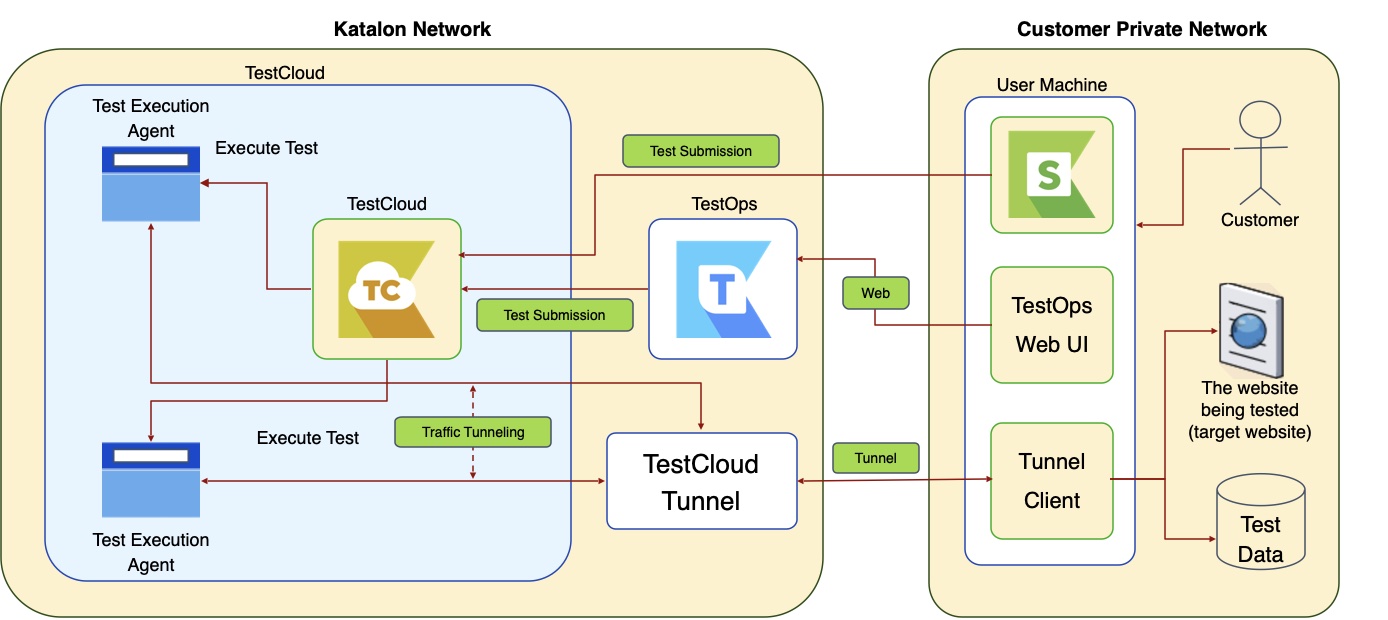
The tunnel client runs on a machine inside your private network. Once started, it:
- Connects to the Test Execution - Cloud Tunnel server.
- Opens a session used exclusively for testing.
Set up Katalon Tunnel
For configuration guide, see Configure Katalon Tunnel.
You can run tests with Katalon Tunnel via Katalon True Platform or Katalon Studio:
Tunnels created in Katalon True Platform and Katalon Studio are shared and interchangeable — a tunnel started in one can be selected in the other.