Best practices for scalable & secure testing with Katalon Runtime Engine
This document recommends the best practices for scalable and secure testing with Katalon Runtime Engine ran on Docker. We'll show you how to execute 1,000+ Test Cases with Katalon Runtime Engine on Docker.
Scenario
Your organization is scaling up its automation efforts, moving from small regression suites to a massive library of 1,000+ test cases. Executing this volume on a local machine or a standard VM is no longer viable due to time constraints and resource instability. You are implementing Katalon Runtime Engine within Docker to achieve a scalable, isolated, and high-performance execution environment.
Purpose and strategic value
-
Security & Isolation: Docker provides a "clean-room" environment for every run, ensuring no data leakage or persistent threats remain in your restricted zone.
-
Massive Scalability: Shifting from "Linear Testing" to "Distributed Testing" to reduce execution time from days to minutes.
-
Infrastructure Resilience: Leveraging multiple Katalon Runtime Engine licenses to distribute load, preventing the "Single Point of Failure" risk associated with massive monolithic test suites.
Key takeaways
-
Security First: Why Docker is the safest bet for Air-gapped or Restricted networks.
-
Resource Efficiency: How to "size" your environment to prevent bottlenecks.
-
Scalability: Techniques to handle 1,000+ TCs via parallelization and distribution.
Requirements
Before triggering a 1,000+ TC run, ensure your environment meets these minimum requirements:
-
Katalon Version: Latest Katalon Docker Image (
katalonstudio/katalon). -
Licenses:
-
Active Katalon Runtime Engine Floating licenses (enough for your parallel execution nodes).
-
TestOps per-user licenses, which allow users to access orchestration features and monitor test execution results
-
-
Hardware (per 3-5 parallel streams):
-
CPU: 4-8 Cores.
-
RAM: 16GB (Allocation: 8GB+ for Docker).
-
Disk: 50GB+ free space (for logs, screenshots, and videos).
-
-
Network: Stable internet connection for license validation and application access.
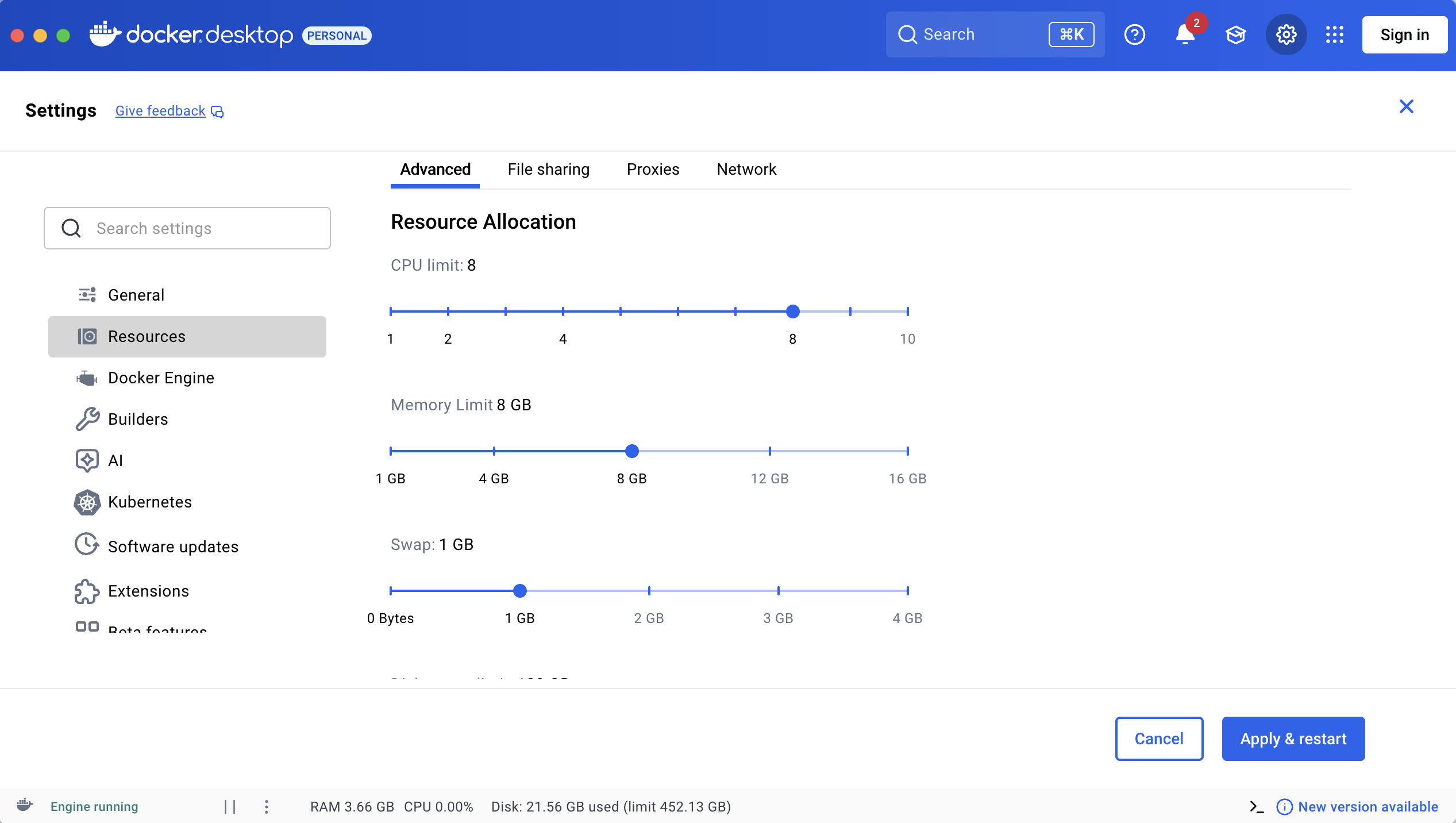
Recommended settings for resource:
| Resource | Recommended Setting | Rational & Strategic Value |
|---|---|---|
| CPU | Total Cores - 2 | Keeps the Host OS stable enough to manage Docker overhead and prevents "CPU Contention." |
| Memory | 75% of Total RAM | Provides enough "breathing room" for browsers and JVM while preventing the Host OS from freezing or crashing. |
| Swap | 2GB - 4GB | Acts as a "safety net" for memory spikes. Warning: Excessive Swap usage will significantly degrade execution speed. |
| Disk | 80GB - 128GB | Ensures sufficient quota for extensive execution logs, high-resolution screenshots, and video recordings across 1,000+ TCs. |
Why Docker for security in Restricted Zones?
-
Immutable Infrastructure: Containers prevent "configuration drift." Every test run starts from a 100% clean, SecOps-approved baseline.
-
Attack Surface Reduction: The Katalon Docker image is stripped of unnecessary services (no SSH, no Telnet), making it a "hardened" target.
-
Data Sovereignty: By mapping local volumes, you ensure that even if the container is compromised, it holds no persistent data—everything is stored on your secure, monitored host storage.
The core pillars of Scalable Testing
To execute 1,000+ test cases with maximum stability, our framework relies on three fundamental pillars. While this guide uses Azure DevOps as a primary example, these principles apply to any CI/CD tool supported by Katalon (such as Jenkins, GitLab, GitHub Actions, or Bitbucket).
-
Orchestration via CI/CD (e.g., Azure DevOps): Automation is key. Using CI/CD pipelines ensures that massive test runs are triggered consistently in a "clean-room" Docker environment, integrated directly into your deployment workflow.
-
Parallel Execution via Test Suite Collections (TSC): We move away from slow, linear execution. By configuring TSCs to run in Parallel Mode, Katalon Runtime Engine can trigger multiple browser sessions simultaneously, drastically reducing the feedback loop.
-
Headless Browser Strategy: For high-volume testing in Docker, "Headless" is the industry standard. It eliminates GUI overhead, reduces RAM/CPU spikes, and ensures the container remains "lean" and secure.
Best practices steps
Step 1: Partition your test suite strategically (apply the 20-TC "sweet spot")
Running 1,000 TCs in a single suite is a high-risk strategy. A minor network glitch or application lag could invalidate the entire run.
-
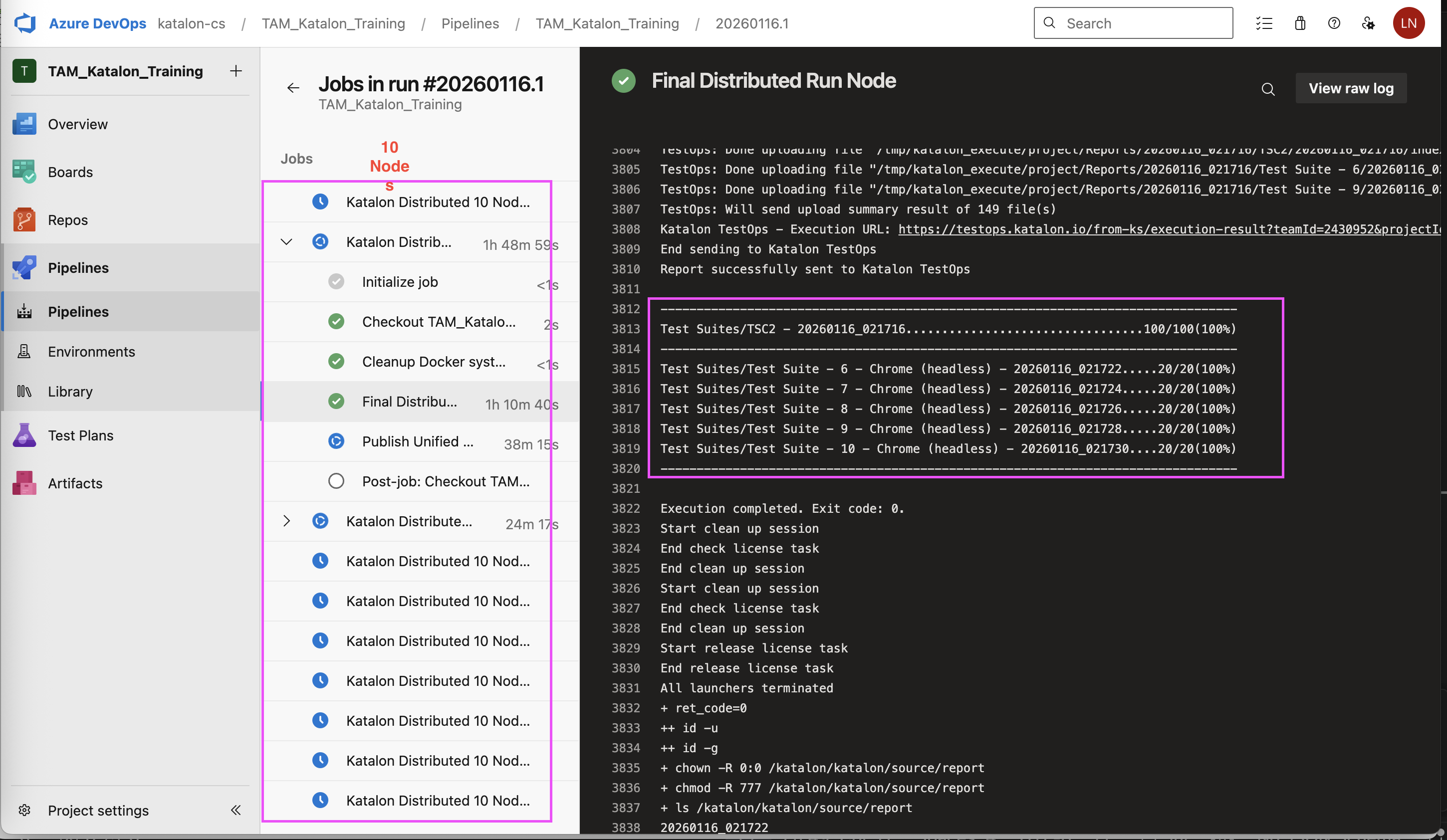
Recommendation: Divide your 1,000 TCs into 50 Test Suites, containing approximately 20 Test Cases each. Group these into 10 Test Suite Collections, with each TSC managing 5 Test Suites.
-
Why: Small suites allow Katalon Runtime Engine to "recycle" memory and resources more frequently. If a suite fails, retrying 20 TCs is significantly faster and more reliable than retrying 1,000.
Step 2: Perform parallelization at a large scale via Multiple Katalon Runtime Engine Licenses
If your organization owns a significant number of licenses (e.g., 72 Katalon Runtime Engine licenses), do not bottleneck them into a single machine or container.
-
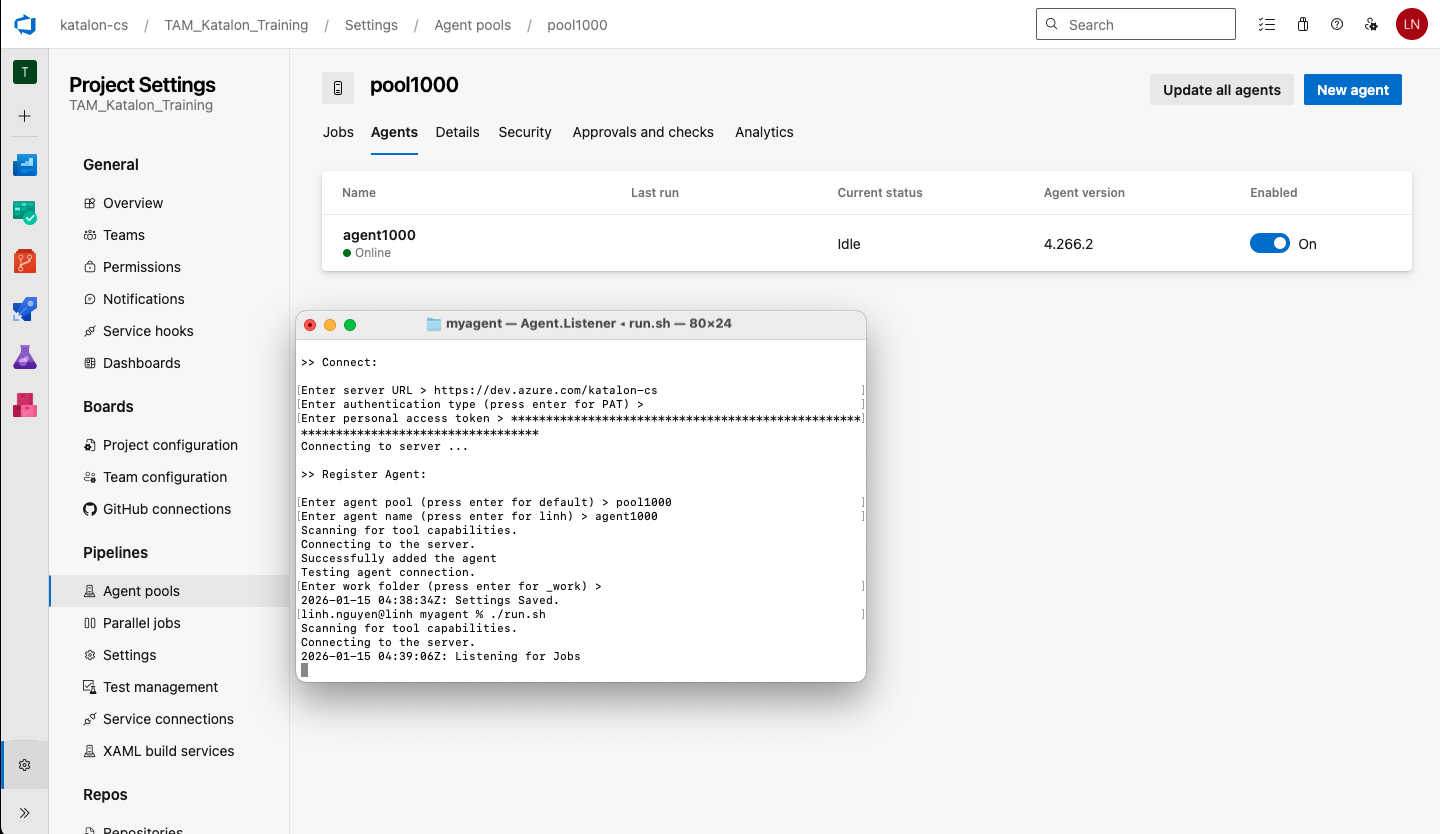
Action: Use your CI/CD tool (Azure DevOps, Jenkins, etc.) to trigger Parallel Jobs/Nodes.
-
Strategy: Deploy 10 to 20 Docker Containers simultaneously across your agent pool. Each container should handle a small subset of your Test Suite Collections.
-
ROI: This maximizes your investment. With 70+ licenses, you can complete 1,000 TCs in the time it takes to run just 20, providing near-instant feedback to developers.
Step 3: Utilize headless browsers & proxy routing
In restricted zones, efficiency and connectivity are non-negotiable. To ensure 1,000+ TCs run without interruption, we must synchronize Proxy settings throughout, from design to execution.
-
Headless Mode: Always execute in headless browser mode, by include this parameter in your execution command:
-browserType="Chrome (headless)". It reduces RAM/CPU usage by approximately 30% and removes the need for virtual display servers (X11), which significantly hardens the container’s security profile by minimizing unnecessary background processes. -
Unified Proxy Strategy: * At Design Time (Katalon Studio): Configure your Proxy settings under Preferences > Proxy. This ensures your Studio can validate licenses and record/spy elements within your internal network.
-
At Execution Time (Katalon Runtime Engine on Docker): Since Docker containers operate in an isolated network layer, you must pass the Proxy configuration directly into the Katalon Runtime Engine command. Use the proxy arguments to point the container to your secure internal gateway.
-
Why this matters: This dual-layered approach allows Katalon Runtime Engine to "reach out" to the Katalon True Platform or License server through an audited tunnel, ensuring that all 10 Docker Nodes can validate their floating licenses simultaneously without needing direct public internet access.
-
Step 4: Practice resource guardrails & staggered execution
To achieve 1,000+ Test Cases with zero "flaky" failures, you must manage how resources are consumed at the moment of impact. Even with powerful hardware, firing all cylinders at once can lead to Resource Contention (where multiple browsers compete for the same CPU cycles).
-
Action 1: Distribute loading (The 10x4 Rule)
-
Limit each Docker container to 3-5 Parallel Instances within its Test Suite Collection.
-
Strategic Reasoning: It is significantly more stable to run 10 containers with 4 parallel threads each than to force 1 container to handle 40 parallel threads. Distributed loading prevents sudden memory spikes and ensures that if one container hits a glitch, it does not jeopardize the remaining 90% of your test run.
-
-
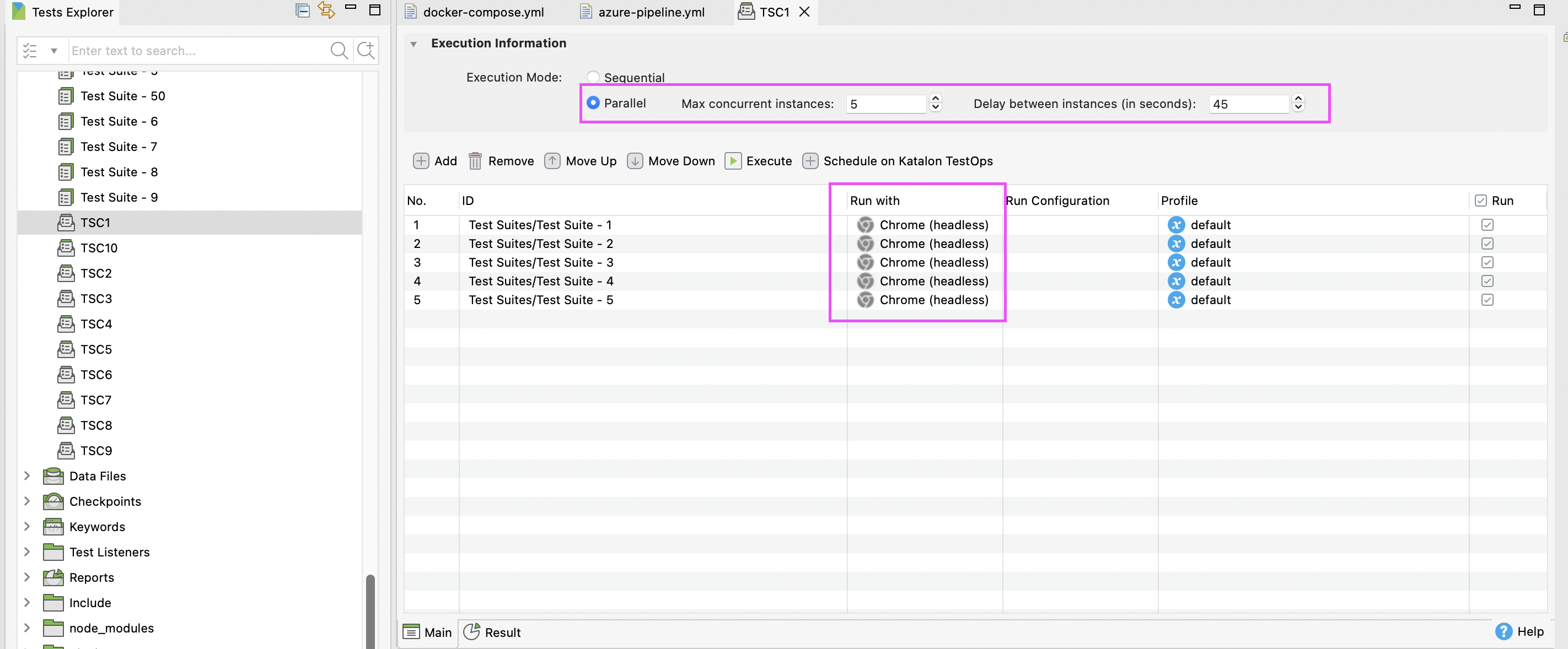
Action 2: Implement the "45-second delay"
-
Setting: Configure a 45-second delay between the start of each parallel instance within your Test Suite Collection settings.
-
Why 45 seconds? * Preventing "Boot-up Spikes": A browser consumes 3x to 4x more CPU and RAM during the initial startup and page-rendering phase than it does during routine execution.
-
Smooth Resource Handover: A 45-second gap ensures the first browser has finished its heavy initialization and settled into a stable state before the second browser begins demanding resources.
-
Internal Network Safety: In restricted environments, launching 50+ browsers simultaneously (across all nodes) can mimic a "friendly DDoS" on your internal UAT/Staging servers. This delay throttles the traffic, ensuring your application remains responsive throughout the massive 1,000+ TC run.
-
-
ADO self-hosted agent
Sample azure-pipeline.yml file
Click to view content
trigger:
  - master

jobs:
  - job: KatalonParallelRun
    displayName: 'Katalon Distributed 10 Nodes'
    timeoutInMinutes: 120
    pool:
      vmImage: 'ubuntu-latest'
      #name: 'pool1000'
    strategy:
      matrix:
        Node1:
          TSC_PATH: "Test Suites/TSC1"
        Node2:
          TSC_PATH: "Test Suites/TSC2"
        Node3:
          TSC_PATH: "Test Suites/TSC3"
        Node4:
          TSC_PATH: "Test Suites/TSC4"
        Node5:
          TSC_PATH: "Test Suites/TSC5"
        Node6:
          TSC_PATH: "Test Suites/TSC6"
        Node7:
          TSC_PATH: "Test Suites/TSC7"
        Node8:
          TSC_PATH: "Test Suites/TSC8"
        Node9:
          TSC_PATH: "Test Suites/TSC9"
        Node10:
          TSC_PATH: "Test Suites/TSC10"
      maxParallel: 10
    variables:
      KATALON_API_KEY: 'c7f462e3-a4ae-4c74-be5f-4921ef57****'
      KATALON_ORG_ID: '243****'
    steps:
      - checkout: self
        clean: true

      # 1.RELEASE MEMORY
      - script: |
          docker container prune -f
          rm -rf $(Build.SourcesDirectory)/report/*
        displayName: 'Cleanup Docker system and old reports'

      # 2. RUN TESTS
      - script: |
          docker run --rm \
          --platform linux/amd64 \
          --shm-size="2g" \
          -v "$(Build.SourcesDirectory)":/katalon/katalon/source \
          katalonstudio/katalon katalon-execute.sh \
          -browserType="Chrome (headless)" \
          -testSuiteCollectionPath="$(TSC_PATH)" \
          -apiKey="$KAT_KEY" \
          -orgID="$KAT_ID" \
          --config -webui.autoUpdateDrivers=true \
          -args="--disable-dev-shm-usage --no-sandbox --disable-gpu --window-size=1920,1080"
        displayName: 'Final Distributed Run Node'
        env:
          KAT_KEY: $(KATALON_API_KEY)
          KAT_ID: $(KATALON_ORG_ID)

      # 3. PUBLISH REPORT
      - task: PublishPipelineArtifact@1
        displayName: 'Publish Unified Reports'
        condition: always()
        inputs:
          targetPath: '$(Build.SourcesDirectory)/report'
          artifact: 'Katalon_Reports_$(System.JobName)'
          filePatterns: |
          **/*.html
          **/*.pdf
          publishLocation: 'pipeline'
| Key Parameter/Command | Purpose |
|---|---|
strategy: matrix: | This keyword instructs Azure DevOps to create multiple run configurations. The system scans the list from Node1 to Node10 and generates 10 copies of the KatalonParallelRun job. |
maxParallel: 10 | This allows Azure DevOps to start up to 10 Virtual Machines at the same time. If your account has enough resources (parallel agents), all 10 Test Suite Collections will start running concurrently rather than waiting for one to finish before starting the next. |
docker container prune -f | This is a "sanitation" command for your Docker environment after each test run. - What it does: It searches for and removes all stopped containers currently residing on your Mac. - Why it's necessary: When running 1,000 TCs divided into multiple Nodes, each completed Node leaves behind a "garbage" container in the system. If not deleted, these containers continue to occupy virtual RAM and network resources. - -f (force) flag: This allows the command to run automatically without stopping to ask for "Yes/No" confirmation, ensuring your pipeline runs smoothly from start to finish.- Benefit for 1,000 TCs: It frees up memory for the Chrome browser in subsequent Nodes, preventing the system from slowing down or triggering the "Tab crashed" error caused by memory exhaustion. |
rm -rf $(Build.SourcesDirectory)/report/* | This command cleans up old report data within the Agent's working directory. - rm: The remove command.- -rf: Stands for "recursive" and "force"; it aggressively deletes all subdirectories and files without asking for permission.- $(Build.SourcesDirectory)/report/*: Specifically targets everything inside the Katalon report folder.Why it's necessary: 1. Prevents Data Confusion: It ensures that reports from a new Node do not overwrite or get mixed up with results from a previous Node. 2. Saves Disk Space: Each set of reports can weigh dozens of megabytes. Deleting old reports ensures your Mac maintains more than 5% free space, completely eliminating the Disk I/O bottleneck that previously caused your tests to hang at 26%. |
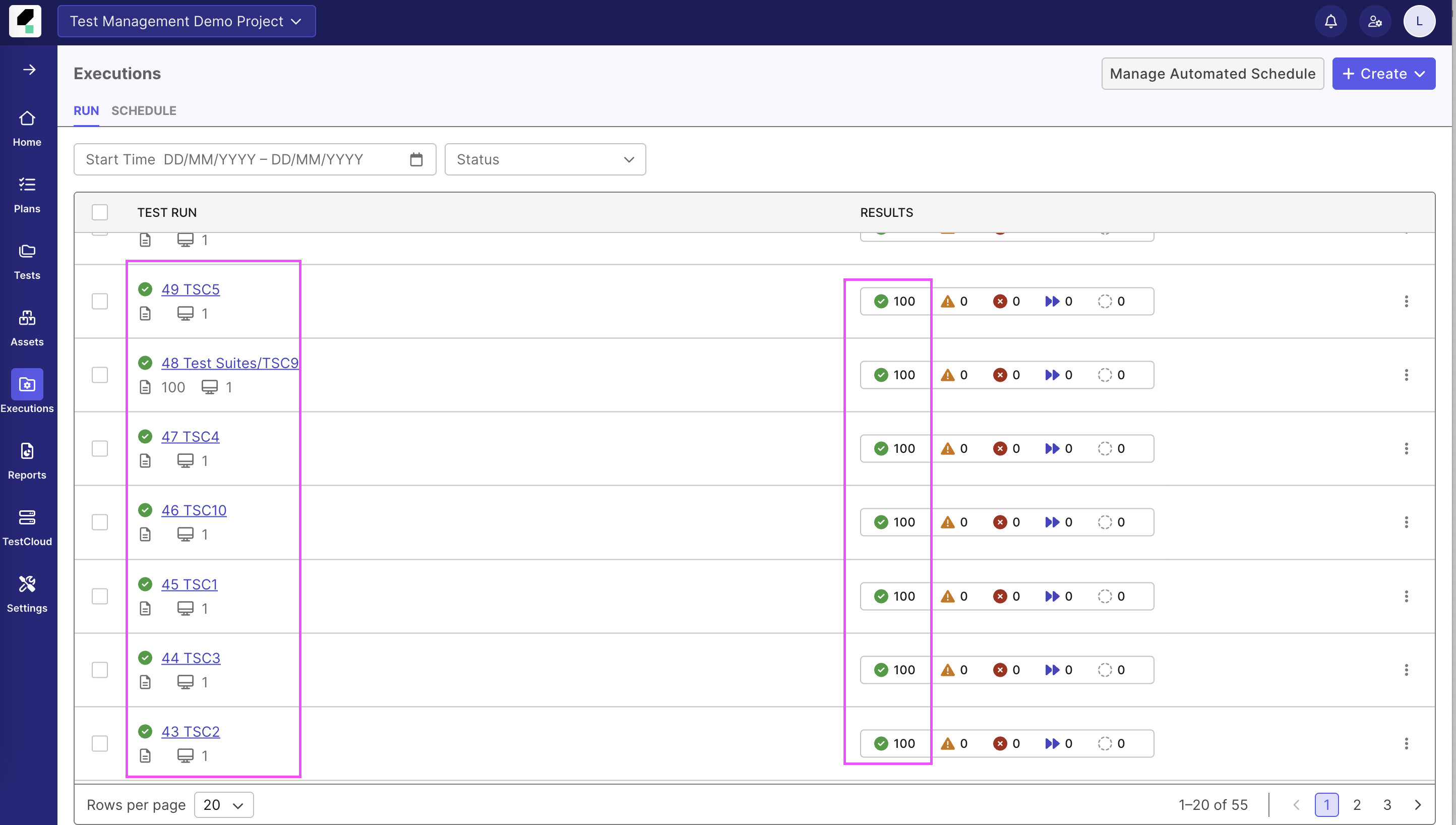
Beyond infrastructure: accelerating to "instant" feedback with Katalon Test Execution - Cloud
While the Katalon Runtime Engine + Docker setup provides a high degree of control and security for restricted or air-gapped environments , scaling to 1,000+ test cases (TCs) on self-hosted infrastructure requires significant effort in hardware provisioning and maintenance.
If your organization aims to move from "Linear" or "Distributed" testing toward a truly Cloud-Native approach, Katalon Test Execution - Cloud offers a powerful alternative that eliminates the infrastructure bottleneck.
Strategic comparison: self-Hosted Katalon Runtime Engine vs. Test Execution - Cloud
View below comparison to consider the best option for your business needs:
| Feature | Katalon Runtime Engine on Docker (Self-Hosted) | Katalon Test Execution - Cloud (Cloud-Native) |
|---|---|---|
| Setup Effort | High: Requires Docker tuning, resource allocation, and CI/CD maintenance. | Zero: No infrastructure to manage; ready to execute immediately. |
| Resource Management | Manual: Must manage CPU/RAM spikes and "garbage" container cleanup. | Automated: Resources are dynamically allocated by Katalon. |
| Execution Speed | Moderate: Limited by the number of active licenses and physical agent nodes. | Massive: Near-infinite scalability, allowing 1,000+ TCs to finish in minutes rather than hours. |
| Primary Use Case | Best for Restricted/Air-gapped zones requiring 100% data sovereignty. | Best for Rapid Scaling and multi-browser/OS coverage without overhead. |